Tuesday, August 30, 2016

Podcast: Distributed teams with Jen Krieger

Increasingly, software teams aren't all working in the same office. Or maybe some are and some aren't. Red Hat's Chief Agile Architect Jen Krieger discusses her experience and offers advice for how to make distributed teams work effectively from appropriate tools, to practices, to behaviors.

MP3 audio (18.21)
OGG audio (18.21)

Transcript

Gordon Haff:  Thanks for joining us today. I'm Gordon Haff, technology evangelist with Red Hat. Today, I'm joined by Jen Krieger, who's the Chief Agile Architect at Red Hat. We're going to start off this session talking about these distributed teams.
We're not going to talk about whether teams should be distributed or not and rehash all the debate about individual productivity versus team productivity and so forth. Because frankly, our experience at Red Hat is that distributed teams are the reality. Not every software engineer in the planet can live in Silicon Valley, or indeed wants to live at Silicon Valley.
Jen, introduce yourself please.
Jen Krieger:  Hi. Jen Krieger, as Gordon mentioned, Chief Agile Architect at Red Hat. Basically, what that means on a daily basis for me is I just roam the halls here at Red Hat and hope people understand what that word, Agile, means.
I'm talking about distributed teams. It's an interesting topic here at Red Hat mostly because we actually have been distributed since day one, work with our open‑source communities and we can't expect everybody to be in the same room all the time. We're very familiar of this idea of having a distributed working environment.
One of the things that I think about a lot when I'm thinking about the word "Distributed" is, going back to that whole concept of what forms of communication are what we call high bandwidth or the most valuable forms of communication. A lot of people in the Agile space would say something to the tune of, "Face‑to‑face communication is the best way to have a conversation with each other."
Actually, today, Gordon and I are sitting across a table from each other where normally we would get over some form of distributed video conferencing to do a podcast. We're actually uniquely in the same room, which is not standard for us at Red Hat.
What I like to tell people is generally, when you're talking about face‑to‑face communication, video conferencing, email, IRC, all these different methods that you can use to communicate, it doesn't mean that face‑to‑face is the only way to communicate nor does it mean it's the perfect way to communicate.
Some people actually prefer not to have a face‑to‑face communication because there might be language barriers, personality barriers. Maybe it's easier for them to think about what they want to say before they actually are meant to say it.
There are other concerns and other considerations, especially in the world of software engineering today. it's not that it's bad to be distributed, we just have to recognize as an industry what it means. It's the same with face to face communication. That can't be your "Mode one" of communication, if you would. You have to think about the impact that other forms of communication may have on the ability for you to communicate the ideas that you're having.
Gordon:  We're going to get to talking about some of the tools and techniques for using those tools and some of the best practices, but one thing I'd like to start off with is we had talked about distributed teams. We talked about non‑distributed teams. The reality is that there's usually going to be some sort of mix of those things, and that mixture can be challenging itself.
Jen:  In my experience, I've had several different situations. One of the Agile teams I've had most recently, they were all in the same office. There were six of us, all the cubicles centralized together. We had the glass pulled out between them, so we could have that truly collaborative, truly just face‑to‑face type of environment.
It actually worked really well except there were some challenges, because we didn't necessarily want to be in everybody's face all the time. If you are an engineer, it's really sometimes hard to be in a situation where you're constantly pulled out of what you're trying to think about. We would actually pick a day every week where everybody would be working from home, so that folks could focus on just getting their work done.
I’ve also had situations where I would say 90 percent of all the people on the team are distributed, so they're working in their home offices, or one of them is in one of our main offices. There's not really a challenge of trying to share communication, because everybody has to take that second step to communicate. Everybody is distributed. Fundamentally, no one is in the same location.
The third challenge, or the third type of team that I've worked with, is the team where a couple of people are distributed but the central portion of that team is located in a main office and located very close to one another.
They all have their different types of challenges and different ways to address them, but I would say the one situation that is harder to deal with is that third situation, where I'd say maybe half your team is all in one place and half of the team is distributed, so some people are getting the benefit of that face‑to‑face interaction and the hallway conversation, and half the team is not.
Gordon:  Let's talk about that third situation, because I think that's very common, maybe it's even the most common today, in the open source world, very distributed teams are often a norm.
That's maybe not quite a norm at a lot of other organizations but I've certainly seen that myself, whether we're talking software development or something else where decisions get made informally around the water cooler or over pizzas, over beer, whatever, and two or three guys or gals who are in London, in Hawaii, in wherever they're working from, they find out after the fact, "That's right, we've made that decision over lunch last week. Sorry. We'll try and remember to tell you next time."
What are some of the best practices that you've found for dealing with that kind of environment specifically?
Jen:  The best situation that I can recall in my own career is, I would say it's about 12, 13 years ago now. I was the sole distributed team member of a team trying Scrum for the first time. Everybody else was in our Miami office and they were all, on a daily basis, participating in live and active vocal conversation.
I was their Scrum master, sitting in my remote office in Raleigh, North Carolina, trying to somehow manage impediments and manage the team from a very remote place. There was no technology at the time, at least at that office that we could rely on because the company didn't have Slack. It was nothing back then.
Maybe we could've signed up for WebEx but it was too expensive. We didn't really have anything other than a phone. Get that. I was a remote team member, being a Scrum master, and all I had was the phone. A lot of times, what would happen is they would have team meetings and they would forget to call me, because the phone exchange didn't allow direct call in, if they didn't call me, I just didn't go to the meetings.
I became very familiar with the angst of being that remote team member and came up with a long list of things. It wasn't that long. it was top three things that I needed that team to do, which is not forget that I was up there.
We played fun games, we printed out a picture of me. We put it on the conference machine so they would bring it around the meetings so they will remember that I was to be called on the phone. Simple things like that. Now that we have all this technology out there, there are a lot of other things that e can do to integrate that team into a central office.
One of the best things I've seen a team do is have one of those gigantic monitors in the center of a team area and actually having a running live feed of folks to actually join in video conference. Whenever they are thinking to say hi to people, they can just dial in and their face shows up on the monitor.
It's a little awkward if you're in a large office where lots of people walk through all the time. If you are in a small situation where you can actually dial in, you can see people sitting around. It's fun to see that.
The other thing that is really important is, those water cooler conversations are not going to stop happening. They are always going to happen. That's human nature to have a conversation with somebody. If you are sitting right next to them, to not have the conversation is a little weird. You're going to wind up having a conversation.
The things to understand though is that when you are making decisions, the first thing I always like to tell people is, "Who you actually bring to the decision making room is actually a pretty important topic." If you are going to randomly make decisions in the hallway without all the people who need to be in that decision, it's probably not going to be a very good way for you to actually get consensus or drive change to your organization.
If you're going to make a pretty impactful decision, you probably should make sure that you have all the decision makers in the room when you're doing that. Yes, it does slow the decision making down, but in some cases it probably is a good idea.
Example, you're making an architectural decision about your product line. Something needs to change. You're going to switch one technology in for another technology. Is it appropriate for you to have that decision made over a water cooler or should you bring in the extended team who is going to be impacted by this decision to get their feedback on that.
Option number two is probably better than option number one, but it also doesn't mean that every single decision has to be in that central decision making body. I would also say that there are probably some decisions that aren't going to really matter like, "What time do you have your stand‑up meeting?” If you guys want to make a decision and simply say something to the tune of, "Five out of six team members think we want to change it to this time, is it OK with you sixth team member? Would you mind if we do that?"
Trying to delay that conversation until everybody is on the phone may not make sense. It's a matter of determining the decision that need to be made or the question you're asking and how critical is the question, how much impact is it going to have? What's the risk level of the decision you make? Is it really risky? If so, you probably want to talk to more people to reduce the risk of what you might be deciding to do.
Gordon:  Maybe related to that, one of the things that I've often found challenging in my career when I've been dealing with folks who are maybe not right next to me, maybe just in another building in the same location, there are a lot of decisions and a lot of useful conversations just to flesh out thinking, that maybe don't fall into the formal decision making bucket, but they're just part of the day to day interaction.
I find a lot of time, when people are remote from each other, it's harder to have those conversations because you feel like, "It's not really worth bothering that person with a phone call to talk about this half‑formed thought I have." What are some ideas you have about dealing with that kind of thing?
Jen:  It's interesting because a lot of Red Hat doesn't have...maybe they do, but my observation is, a lot of the engineers I work with don't fall into bad habits because they generally use IRC to communicate.
I watch this every morning, when I get into work, people say, "Good morning." Some folks chat about what they did the previous evening. There is a connection that people make during the day. They have general conversation during the day that helps with that cross‑communication.
The interesting part about that is to layer that team dynamic on there where you've got most of the folks located to one office and a few people distributed, I would imagine that a lot of the conversation and the general chit chat happens around cubicles, happens around whatever space that team occupies and rarely, if ever makes it back to IRC, or whatever communication channel you choose to use, whether it be email or maybe Skype, whatever you're using.
It's important for teams to understand, especially if you're committed to doing something together as a team, that you have a social responsibility to the folks that you're actually interacting with. It's not just, get on your team meeting and immediately start talking about work but it's asking somebody about their day, or finding out what they did over the weekend, or trying to make some sort of social connection so that it's easier for you to have casual conversation.
In your own case, you might feel like you can't reach out to somebody and share that half‑baked idea because you don't know them too well. If it was somebody that you knew, you wouldn't hesitate to pick up the phone and have that conversation with them.
Gordon:  When was an industry analyst for a number of years, one of the things I found was that I can certainly connect with people over the phone and have good personal connection with them, but it was much easier if I had actually met that person in real life and had dinner with them, had some beers with them or whatnot.
This comes back to, there is some value in these high‑bandwidth, in‑person communications because often, once you've established those things face to face, that's probably an argument. For example, having a commitment to things like team off‑sites, if you are possibly in a position to afford them.
Jen:  Companies probably make out a little bit by having distributed work force, especially if they're not paying for co‑working space or Internet or a phone, they're putting that burden on their employees, they probably are making a little bit of money by not having to pay for office space or maybe not making money but having it reduced overhead for having to pay for something...a gigantic office building in downtown Raleigh.
The critical point is that it's not as easy to just say, "If I am not paying for a desk, that means I have X dollars free to do whatever else with that I need to," because there actually is the bottom line impact to the way that people are able to work together. Often, because it's not a quantifiable one, as in I can't establish that if I don't get Team A in the same room at least once a year, I can say for sure that they'll have a decrease 10 percent of production. I can't say things like that.
I can't quantify that to a finance person and say, "If you give me $5,000 so that they can all travel to a team bonding exercise or whatever you want to call it, I can ensure that they will have a steady line production for the rest of the year." I can't say stuff like that.
Anecdotal evidence indicates to me that it actually is a critical and important part of everything that we do as an industry. One of the things that I have had happen recently is that I did work with a team that was very distributed. They were from all over the world. They were not really brand new together.
They were having a little bit of trouble actually working well together and coming up with just a general backlog. Everybody was new to whatever it was going on on that space. We brought everybody together so that they can meet each other, have food together. People bond while eating. It's just a thing. It's a universal thing, whether it be beer in the Czech Republic or Italian food in Little Italy in New York City, people bond over eating and drinking. It's just a thing that we do as humans.
By giving them the opportunity to do that bonding, they just worked better together afterwards. That face‑to‑face interaction, it's critical for me, especially being a distributed employee to have that bond with people on a regular basis.
Gordon:  I still remember a few years ago. It must have been a LinuxCon, it was one of the Linux Foundation Events. There was a kernel panel talking about how the development process worked with Linux, kernel and the like.
One of the kernel developers, one of the core maintainers, I don't remember which one it was, but he made a comment about one of the reasons that Linux kernel development has historically worked as well as it has, is that fortunately a lot of people involved...certainly, there's a lot of individual contributors as well but a lot of the core people involved... work for pretty well resourced companies, IBM, Red Hat, Intel, Hewlett Packard, and so forth.
That provides the opportunity and the budget, frankly, that people can get together in Linux Plumbers events, LinuxCons and the like. From their experience, this has been a very important part of Linux kernel development historically even though on a day to day basis, Linux kernel developers are all over the world.
Jen:  They cite the social interaction they're having as their ability to long‑term work well together.
Gordon:  Absolutely.
Let's switch gears a little bit and talk a little more about some of the benefits you see with specific tools. You raised a great point about IRC and Slack...call them messaging but in a sense, they're almost ambient distributed conversation.
To add to your point, when I had this feeling in my product management days that I had to go around and have in‑person conversations because things weren't important enough to bother some of them with an email or with a telephone call. One thing just those kind of tools provide is they do allow for this asynchronous, non‑interrupting type of conversation to take place.
Jen:  It's interesting too because a lot of people think that they need to read everything that comes across IRC. I choose to read when I am available. If I've got a gigantic back load of things that I've not read yet, I just say, "Forget it," and start wherever I am at that given moment.
It is ambient conversation. It's not conversation that should be...if we're talking also too about that decision making, IRC is probably not a great place to do decision making because unless you're paying attention in the moment, it's likely that you won't even notice that a decision was made, or if you're trying to make a decision at IRC and somebody makes a decision, make sure it gets logged somewhere else so that you can actually go back and look at it later.
Slack is better for that because if you've got Enterprise Slack, you can watch and you can read the entire history. You can see some of that stuff. I know there are ways in IRC that you can also do that. Obviously, I've got a proxy set up so I can see the entire backlog. Again, it's like the social existence around those messaging systems where it's not necessary or mandatory for you to read everything. It is really just general chatter.
It's like whatever you would be experiencing while you're in the office, you'll just listen to people talking. I was just sitting over in the breakout room and I could see people just having random conversations, I could hear them doing it. I didn't necessarily need to listen for content. I just knew that they were having a conversation.
It's a way to pass information back and forth pretty quickly but it's also a way to feel maybe a little bit bonded to the people that you're working with even though you're not participating in that given moment.
Gordon:  We've talked about documenting decisions and we need to make certain decisions, make sure everybody in the team knows. What are some of the practices that you use for documenting decisions that everyone has participated in?
Jen:  The easiest way to say that is that if you are working at a product line and you have some sort of roadmap of what you're trying to develop for the year or maybe even a given release. The easiest way to track those decisions is to associate the decisions directly with the work that you're actually doing.
In the space of Scrum and Agile, we call them user stories. We tag them back to problem statements in which we're trying to solve something for our customers. They go through this, not massive process, but a pretty well‑defined process of how we get from problem statement to actual user story where our team is going to do something, but if you are making a decision about, "I'm going to use technology A versus B to solve this problem," and you decide to go with technology B, the easiest place to put that decision is on that user story.
Long‑term, it's harder to capture that information for product line. If you make decision, we're going to go with technology B, how does your customer know? 10 years from now, how do you remember that you actually made that decision? The best way to do that is just to document your product.
I don't really know any better way to do it. Maybe you could have a system to track decisions and you can go back and you can say, "On October 1st made a decision and this is what the outcome was,"
I don't really know how that's valuable if it's not tangentially related to the product that you're working on. Say you're doing a CICD system and you choose Jenkins as your technology, I don't think it matters who made the decision or when you made the decision but rather, was it implemented, is it in the product line, can you document how to use it or what the implementation details are? Those are the things that matter.
Tracking when the decision was made and who made it feels maybe a little bit like you're feeling untrustworthy about who made the decision or why was the decision made. Associating back to the actual work that you're doing is probably the best place for you to be.
Gordon:  Continuing on the theme of tools, one of the things that's been percolating for a long time in business is video conferencing. It would be fair to say that historically a heck of a lot of money has been wasted for not much effect. How do you feel about the current generation of tools and what their value is in terms of teams working together?
Jen:  I don't know anybody who doesn't complain about video conferencing. I was legitimately just at Agile 2016 and listened to some hallway conversations about people complaining about video conferencing. I just took a casual poll where, what are we using? All the big names came up.
Everybody goes through this 5‑ to 10‑minute pre‑conference...there's Internet memes about this. Pre‑conference, who's on the phone? Dialed in, interrupting. All these things have happened.
There are definitely improvement from what I had when I was working and that sole employee, remote, because I had nothing. It's 2016, it should be far better than it is. It just doesn't seem to be any better in the last five years than it was when I first joined Red Hat, really. It just seems to be not going anywhere.
Gordon:  We can all agree that some of the messaging tools, for example, are really quite good now. Without starting a traditional Internet versus software as a service knockdown, you'll find certainly Slack or potentially other tools in that general bane. It has legitimately moved to promote collaboration forward.
I can remember having conversations with Novell maybe 10 years ago when they were doing a lot of work on collaboration. Wouldn't it be nice to be able to do the equivalent of standing up at whiteboard in a room with a bunch of people sitting there and have that kind of interactive, very rich visual experience? The fact is, it's still pretty bad.
Jen:  That's actually a pretty interesting conversation because I've been looking for whiteboarding programs for a while. Just so that we're all clear, especially for folks listening to this podcast who might be creating a for‑pay tool that's really fantastic, I'm looking for free things, things that my Linux users will feel comfortable using.
The space here is not that broad. There are some really great things out there but they're not necessarily perfect. They're still worlds away to go.
I was actually talking to one of my friends a couple of months ago about...I guess they were using these smart whiteboards that they purchased for one of the school systems. I was asking her how it was going. She said it was a complete disaster because no one knows how to use it and so they were immediately broken. They've got these $25000 whiteboards that no one knows how to use.
It was a complete waste of money and time because they don't understand the technology. You can get these really fancy things that unless you really know what you're doing, you don't know what to do. That's sad, right?
Gordon:  Yeah. I'd hate to admit this but probably 20 years ago, having things that take pictures of a whiteboard or that you could use different colors and write and it would supposedly put this onto a computer screen, none of that stuff really worked. I'm sure we spent at least a few tens of thousands of dollars in this stuff at a former employer that never really worked. The really sad thing is, I'm not sure we're an awful lot better today.
Jen:  No. A lot of the video conferencing stuff is always going to be challenged by networking and bandwidth caps. Unless you are somebody who wants to pay a significant amount of money for your home office Internet connection, you're going to be challenged by that. That's not something that I think...technology obviously will make that better as time goes on. Right now, given the state of things in general, it's a goal that's far out in the future to be able to stream video back and forth like that, and not have problems.
Gordon:  I've heard some of the very high end Cisco systems. You have a special room and you have someone directing the cameras. It can be very good. Of course, at that point, pretty much everybody says, "Let's just fly together to a nice place." [laughs] To get there.

Jen:  I have a lot of friends who work at Cisco and they claim that these systems are fantastic. I believe them.

Tuesday, August 23, 2016

Video: Getting started with DevOps

At Red Hat Summit, Dylan Silva and I co-presented on getting started with DevOps. We focused on two scenarios. I discussed using OpenShift to create a complete DevOps environment and workflow. Dylan covered using Ansible to quickly and easily automate tasks that are getting in the way of developer and ops productivity.

Series of posts about modernizing virtualization

Screen Shot 2016 08 23 at 1 29 04 PM

In a recent series of posts on the Red Hat blog, I took a look at virtualization modernization with a particular emphasis on incrementally building off of existing virtualization investments and on the management of, often heterogeneous, virtualized environments.

The first post set the stage for the series, noting that:

Some readers might be thinking that virtualization is yesterday’s news. But it continues to play a major role within just about every enterprise IT infrastructure whether measured by the number of applications it touches, the expense of supporting it, or the number of administrators needed to manage it. At the same time, it’s often not used efficiently. At Directions 2016, IDC Group Vice President for Enterprise Infrastructure, Al Gillen, noted that virtual machine (VM) density is stalling out at about 10 VMs per server and between 30 to 50 percent server utilization. This leaves ample room for improved efficiencies and financial value.

The second post focused on getting things done faster such as by introducing self-service (with Red Hat CloudForms or with Red Hat Enterprise Virtualization itself), automating (e.g., with Ansible), and by simplifying integration. 

The third in the series looked at saving time and money—always high on the concerns of IT operations folks. Efficient management is a big piece of this given that, in many cases, the server sprawl that virtualization was often introduced to address simply became “VM sprawl,” a similar problem at even higher scale.

The virtualization platform itself can also save money. For example, performance features in Red Hat Enterprise Virtualization (RHEV) such as KSM memory overcommitment (which allows users to define more memory in their VMs than is present in a physical host) and  SR-IOV for the virtual machine network (which increases network throughput while decreasing latency and CPU overhead for near bare-metal performance) enable high VM densities. As of March 31, 2016 Red Hat held the x86 2-socket world record for SPECvirt_sc2013, the standard benchmark used to evaluate performance of datacenter servers used in virtualized server consolidation.

Finally, I discussed how security features and compliance relate to modernizing virtualization. Again, management plays a big role. Red Hat CloudForms provides robust mechanisms for cloud infrastructure with automation, advanced virtualization management controls, private or hybrid cloud management capabilities, and operational visibility. This includes aggregate logging capabilities that let you segregate, log, and allocate resources by user, group, location, or other attributes. Among other benefits, this helps you to find systems that are out of compliance so that you can take quick remedial action.

This complements the foundation provided by Red Hat Enterprise Linux and RHEV. For example, the RHEV security model takes takes advantage of the SELinux and sVirt capabilities in Linux--including mandatory access control (MAC) for enhanced VM and hypervisor security.

(For a broader picture of security and compliance at Red Hat, take a look at the whitepaper that I wrote earlier this year.)

Monday, August 22, 2016

Internet-of-Things (IoT) at Gartner Catalyst

1 kRiM0T4e7iHbREUGouUtOw

I was out at Gartner Catalyst in San Diego last week and I’ve been trying to mentally sort through what might serve as interesting observations from the event. It covers a broad range of topics relevant to technical professionals, so it’s been a bit hard for me to distill the sampling of sessions that I attended into a single storyline. However, an unrelated piece on IoT that I read this morning—and the graphic that graces this page—got me thinking about some themes both specific to IoT and applicable to emerging technologies more broadly.

Accelerating pace

At one level, the fact that IoT was prominently on display in a keynote, as well as in a variety of breakouts, is certainly not surprising. There was plenty on containers and container orchestration too. Gartner VP Eric Knipp even highlighted open source as a “cool forever” technology. Well, duh, you may be thinking. Do any of the cool kids not talk non-stop about topics such as these?

Here’s the thing though. How shall I put this nicely? The cool kids tended not to go to Gartner conferences or be Gartner clients historically, Indeed, for many shades of cool, that’s still the case. This isn’t predominantly a startup hub place.

Many of those conservative banks and manufacturing companies and logistics vendors now care about the latest technologies as well. They have to; digital transformation is a thing and the cost of doing nothing is higher than ever. They may adopt new IT approaches slower and more methodically than the Silicon Valley company setting VC dollars on fire. But they’re at least interested in learning about projects, products, and tech that may have not have even existed a couple of years ago. It’s a big change from the days when a lot of these folks weren’t especially interested in anything that wasn’t already in production at a hundred of other sites in their industry.

IoT: The Bad

Scenario from the keynote. Car window gets broken by a thief. The police are automatically summoned. The owner’s insurance company is informed. Repair quotes and automatically generated and a repair is quickly scheduled in time for that evening’s anniversary dinner plans.

Heartwarming. Efficient. A marvel of modern networked communications.

Skip over for the moment all the automagical seamless interaction of communication systems, document formats, and workflows designed to “just work.” At the risk of being a luddite, this degree of autonomous interaction with and between third-parties sets off my creep-meter. 

Perhaps I’m overreacting in this specific scenario. But I think it’s hard to argue with the fact that we’re being bombarded with more and more IoT examples in which it seems that someone stopped at the “can it be done stage” without much if any thought given to the “should it be done" question. Whether because it’s creepy. Or even just solves a problem that no one has.

IoT: The Good

Yet, the same keynote also featured an IoT use case from Duke Power that was exemplary on a couple of fronts.

For one thing, it was a joint presentation featuring leaders from both information technology (IT) and operational technology (OT) within the company. Driving cooperation between IT and OT was a key theme both in this session and woven throughout the conference as a whole. Reporting from the event, Craig Powers writes:

 “At Duke, OT and IT have been apart for many years—we barely touched,” says Shawn Lackey, director of strategy and architecture at Duke Energy. “OT was mainly analog; IT was moving towards digital—we needed to start bringing the two together.”

Lackey was speaking Monday during the opening keynote of industry analyst firm Gartner’s Catalyst Conference in San Diego.
But connecting OT and IT wasn’t necessarily easy, just ask Lackey’s colleague Jason Handley, director of smart grid technology and operations at Duke, who also spoke during the Gartner Catalyst keynote.

“I did not want to talk to IT to begin with,” Handley jokes. “But my attitude has changed. Legacy operations for OT were based on protection and control and nothing else is going to trump that—but now we need to move digital data, and that is only happening by partnering with the IT folks.”

It’s also just a good example of building toward an integrated system that meets genuine business and customer needs. The video goes into more detail but the basic idea is that, using real-time sensor and metering information, the grid will be able to quickly route around certain types of physical damage.


 IoT: The Ugly

The keynote didn’t have much to say about IoT security but breakouts dove into considerable detail. For example, Gartner’s Erik Wahlstrom covered “Securing Digital Access in IoT Solutions” while his colleague Erik T. Heidt spoke on “Securing IoT from Edge to Platform and Beyond."

A couple of common themes were lifecycle management and dealing with the diversity of edge devices.

For example, Wahlstrom noted that “sneaker net” is still a common way to provision identity in IoT; the problem is that when things are done this way, there’s no automatic way to provide updates and otherwise manage the device over time.

There is a lot of work going on with IoT security and identity management, including the development of new standards. For example, Enrollment over Secure Transport (EST), is "a new standard (RFC7030) designed to improve the lifecycle management of digital certificates, a key element for secure communications.” However, standards have to cover many different areas—this presentation by James Fedders of Intel gives a sense of just how many—as well as many different classes of edge device: small/smaller, connected always/sometimes, plugged in/low power, etc. For example, the aforementioned EST requires HTTP to work and therefore isn’t a fit for the most contained edge devices.

I’d sum up the security (using the term broadly) conversation is that there’s a general recognition that it’s important. And work is going on. But there’s a huge amount left to be done and, if security is valued in principle, I see far less evidence that it’s universally valued in practice. 

[1] Graphic by http://anandmanisankar.com/posts/IoT-internet-of-things-good-bad-ugly/

Video: Lessons learned on the DevOps front

At Red Hat Summit in June, Katrinka McCallum and Jay Ferrandini shared their experiences and lessons learned in the process of rolling out DevOps in the Product and Technologies organization. They call it their banana/pickle story, a reference to the pre-DevOps challenge of delivering to users the banana that they asked for instead of the pickle that they didn't want.

This was one of the highest-rated sessions in the IT Strategy track and Summit and is a must watch if you're interested in case studies about how real organizations are implementing DevOps, the challenges they face, and the benefits they gain.

Wednesday, August 03, 2016

Gordon's Hafftime #9: IoT

Topics:

  • ThingMonk coming up and placating the demo gods
  • Podcast relaunch upcoming
  • Thinking about IoT through a vertical lens

Get this issue

Subscribe

Tuesday, August 02, 2016

Links for 08-02-2016

Photos: Japanese temples, food, and more

Omicho Market, Kanazawa

After speaking at LinuxCon in Japan, I spent a week touring about Kyoto, Takayama, and Kanazawa. All my photos here.

Thursday, July 14, 2016

Presentation: Containers-Don't Skeu Them Up (Use Microservices Instead)

William Henry and I gave this presentation at LinuxCon Japan in 2016. (About 8 hours after getting a panicked 3am email to fill a no-show slot.) It's similar to what we gave at LinuxCon Dublin last year but there are a few updates.

Skeuomorphism usually means retaining existing design cues in something new that doesn't actually need them. But the basic idea is far broader. For example, containers aren't legacy virtualization with a new spin. They're part and parcel of a new platform for cloud apps including containerized operating systems like Project Atomic, container packaging systems like Docker, container orchestration like Kubernetes and Mesos, DevOps continuous integration and deployment practices, microservices architectures, "cattle" workloads, software-defined everything, management across hybrid infrastructures, and pervasive open source.

In this session, Red Hat's Gordon Haff and William Henry will discuss how containers can be most effectively deployed together with these new technologies and approaches -- including the resource management of large clusters with diverse workloads -- rather than mimicking legacy sever virtualization workflows and architectures.

Presentation: Fail fast, fail often

My colleague William Henry and I just gave this presentation at LinuxCon in Tokyo. It ties into central DevOps concepts such as experimentation, constant iteration, and having a culture that supports these types of activities.

Here was the abstract:

Software projects were historically managed on a bet the farm model. They succeeded or they failed. And when they failed (as big software projects often did), the consequences were typically dire for, not only organizations as a whole, but for many of the individuals involved. Today, by contrast, many software and the development projects have evolved toward a much more incremental, iterative, and experimental process that takes cues from the open source model which excuses (and even rewards) certain types of failure.

In this session, we’ll discuss how failure can be turned into a positive. This includes the organizational dynamics associated with tolerating uncertain outcomes, the need to define acceptable failure parameters, and the technical means by which experimentation can be automated in ways that amplify the positive while minimizing the effect of negative outcomes.

Tuesday, July 12, 2016

Gordon's HaffTime - Issue #7 is live

Issue #7 talks travels, Red Hat Summit, automation, and gives a shout-out to a really good game.

Become a subscriber.

Thursday, June 30, 2016

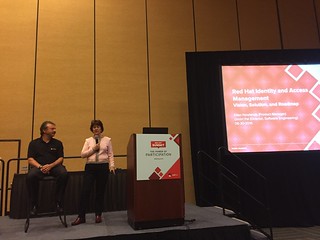
Red Hat Summit: Red Hat Identity and Access Management

Smite I Pal and Ellen Newlands talk identity management at Red Hat Summit.

In this session Red Hat’s Ellen Newlines and Dmitri Pal discussed Red Hat's identity management portfolio from a near-term perspective, and presented the long-term roadmap—along with some advice for implementing identity management.

These are some highlights and quotable moments from the talk.

Identity management is complex but it’s something you need to do to protect your environment and, ultimately, the assets of your organization. Red Hat is focusing on making IdM automated and cost effective so that customers can focus on their business. It’s Red Hat’s job to provide the expertise.

The areas of vision:

Authentication

You need to be able to authenticate from different types of credentials including passwords, certificates, smart cards and OTP tokens. And use single sign-on using Kerberos, SAML, and OpenID connect. Weave together multiple operating systems, multiple credentials, multiple authentication schemes (including a trust relationship between IdM and Active Directory in a Microsoft environment). 

Managed security.

Consistent Delivery

If you have consistency in the identities and access to them, you can deliver to systems, service

s, and applications together with policies to control access and privilege escalation. The goal is to make the use of this environment relatively seamless (even given the complexity).

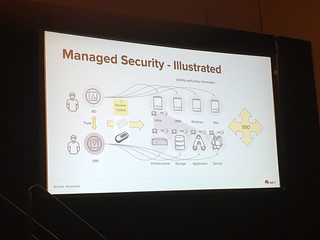
Managed Security

The challenge is the management of identities in a complex interoperable world. The keys, the certificates, the other secrets need to be automatically provisioned, tracked, and rotated on an as-needed basis.

DevOps Enablement

Developers need to have the tools to build the next generation of containerized and non-containerized applications with authentication and the consistent delivery of security. If the developer can’t do this, what they’re doing isn’t much use in a production environment.

Some guidance for identity management:

  • Single source of identities. Don’t copy pass words around! It also makes it much easier for audit when identities are in a single place. 
  • Single sign-on is good. You need to protect the keys to the kingdom, but once you’ve established, use it as much as possible.
  • Don’t put passwords into files. Instead use Kerberos or certificates, or fetch secrets on the fly. When you build applications and stitch things together, think about how they’re going to talk with each other. It requires a bit more effort but don’t be afraid to move forward.
  • Automate your operations. We are in an era where changes are happening in real-time. Continuous integration and deployment of applications are needed to meet these business needs. Adopt the tools you need to do things in a simple, repeatable way. (For example, Ansible.)
  • Integrate applications so that applications can interface with each other in the context of the user. These interactions need to be managed—which is where an IdM Fabric, as shown below, comes in.

Identity Management Fabric.

Wednesday, June 22, 2016

Getting Started with DevOps (for devs) at Red Hat Summit

This post shares some highlights from Decomposing DevOps: Understanding How to Get Started, a session that I gave at Red Hat Summit in San Francisco this week together with Dylan Silva of Ansible by Red Hat.

Screen Shot 2016 06 22 at 10 52 24 AM

Our general approach in this session was to look at DevOps on-ramps first from a primarily developer-centric perspective and then from a more ops-oriented one. These aren’t mutually exclusive especially given that DevOps inherently commingles dev and ops concerns to a certain degree. Nonetheless, thinking about these two different constituencies is one useful way to frame the discussion.

For the dev-centric point of view about DevOps (which is what I’ll cover in this post), I find that a manufacturing metaphor provides useful insights. Whether building a car or building an application, what are some of the important principles to follow?

The first is automation. Worker productivity in automotive manufacturing has doubled in something like the past 20 years. Automating repeatable processes has simultaneously improved predictability and quality. (I guess it’s an exception to the “Better, faster, cheaper: Pick two” rule.) Similarly, developer automation that leads to an iterative CI/CD pipeline with build/test/approve/deliver/deploy stages leads to both faster and higher-quality software delivery.

Screen Shot 2016 06 22 at 1 45 43 PM

W. Edwards Deming, one of the original champions of statistical quality control, once said that “Without data you’re just another person with an opinion.”

Measurement and metrics are likewise a key ingredient in an iterative software development pipeline. DevOps metrics were actually the topic of a separate birds of a feather session discussion that I led with my colleague William Henry. A full discussion is beyond the scope of this post, but when thinking about collecting data it’s useful to step back and consider your most important objectives and then design a plan from that starting point. 

The automotive industry, like others, has embraced the idea of modularity and reuse; about half of all cars are built on a modest number of platforms that share key components and design elements across models and across brands. We see this same modularity in the concept of microservices—small, autonomous, bounded context services that communicate through APIs. Even when microservices aren’t adopted in their purest form, automated DevOps pipelines work most effectively when deployments can be small, frequent, and generally decoupled from other deployments. 

If DevOps can be thought of as transitioning software development from craftwork to a more industrialized set of processes, then the place where new cloud-native apps run can be equally thought of as morphing from a workshop to a factory. This factory has characteristics such as the following:

  • Software-defined infrastructure and/or public cloud
  • Automation
  • Application lifecycle management
  • Developer experience including self-service
  • Application services (databases, messaging, integration, mobile)
  • Container ecosystem
  • Orchestration and resource control
  • Management

There’s enormous innovation happening in all these areas across a wide range of open source communities. However, making all this consumable for developers is certainly a challenge. That’s a big reason why, in a study of DevOps early adopters conducted last year for Red Hat, IDC found that 80 percent expected PaaS to play a crucial role in enabling DevOps because “Platform-as-a-Service (PaaS) cloud infrastructure, self-service developer platform and  tools, and lifecycle management with DevOps processes—speeding time to value for both developers and operations."

That’s exactly what OpenShift does by bringing together technologies such as Red Hat Enterprise Linux, docker-format containers, kubernetes orchestration, CICD pipelines, and developer tooling. Features include:

  • Self-service
  • Multiple interaction models
  • Polyglot, multi-language support
  • xPaaS services
  • Immutable, container-based platform
  • Automation for application builds, deployments, scaling, and health management
  • Persistent storage option

The result? Developers get up and running quickly and gain access to the platform and tools that they need to be productive without sweating the details of the underlying infrastructure.

Tuesday, June 21, 2016

What are the right metrics for DevOps?

5569561425 305949e779 z

If you’ll be at Red Hat Summit check out our BoF and other DevOps sessions.

Ask about metrics for DevOps and the natural reaction is to jump to familiar technology-focused measurements. Uptime. Code deploys per hour, day, or month. Deployment failure rate. Even lines of code.

Certainly, it’s important to have metrics.

DevOps works because continuous iteration and improvement is fundamentally a more rapid and flexible approach to software development than slow rigid project cycles. However, fully realizing this approach to developing and deploying software means putting in place the measurement systems, technologies, and metrics to present actionable insights that can then be acted on appropriately. Adding to the complexity is the need to present appropriate metrics for different audiences such as developers, operations, and business leaders.

Tracking narrow technical indicators can indeed be useful as part of tracking the success of your DevOps initiatives. Analysis may point to trend lines that are pointing in bad directions. An increased number of failures that lead to customer-facing outages can hardly be anything but a negative indicator. Conversely, continuous improvements in measurements such as time to deploy new services are a good indicator that a DevOps initiative is helping to produce positive outcomes.

However, one needs to be careful about overly focusing on easy-to-measure numbers that aren’t necessarily particularly correlated with business outcomes. It can be useful to step back. What are you really trying to accomplish? What’s important to you?

Are you most focused on the deployment velocity of new services? Is improved code quality or more rapid security updates the more pressing factor behind your DevOps? Or are you taking a broader organizational view that emphasizes cross-team collaboration?

These are some of the questions that we’ll be asking as part of what’s sure to be a spirited discussion at the How to Know if Your DevOps is Working birds of a feather session that I’ll be moderating along with Red Hat’s DevOps Strategy Lead, William Henry.

Also be sure to check out the many other Summit sessions related to DevOps.

I’ll be co-presenting with Ansible GM Todd Barr in Getting Started with DevOps. We’ll be talking about on-ramps from both primarily developer-centric perspectives (with a focus on OpenShift) as well as more ops-centric ones (with a focus on Ansible). Other DevOps sessions include:

There are also a variety of sessions that directly focus on how organizations are successfully making use of Red Hat products to implement DevOps today. These include:

Finally, I’d just note that a big reason that DevOps is such a hot topic right now is that it’s part and parcel of a host of interrelated technology, architectural, and business model changes that generally fall under the term digital transformation. Containers, container management, microservices, software defined infrastructure, mobile, and the internet of things are among the technologies that dovetail with DevOps to enable organizations to deliver new digital services quickly and cost effectively. There are lots of Summit sessions on those topics too. Check them out.

Photo credit: Fickr/CC https://www.flickr.com/photos/christinawelsh/5569561425

Thursday, June 16, 2016

Newsletter Issue #6 - Red Hat Summit, OpenShift and more

Read it and/or subscribe!

The end of cattle vs. pets

6830903723 eb2df17454 z

Metaphors and models have finite lifespans. 

This usually happens for one of two reasons.

The first is that metaphors and models simplify and abstract a messy real world down to especially relevant or important points. Over time, these simplifications can come to be seen as too simple or not adequately capturing essential aspects of reality. (This seems to be what’s going on with the increasing pushback on “bimodal IT.” But that’s a topic for another day.)

The other reason is that the world changes in such a way that it drifts away from the one that was modeled.

Or it can be a bit of both. That’s the case with the pets and cattle analogy as it’s been applied to virtualized enterprise infrastructure and private clouds. 

The “pets vs. cattle” metaphor is usually attributed to Bill Baker, then of Microsoft. The idea is that traditional workloads are pets. If a pet gets sick, you take it to the vet and try to make it better. New-style, cloud-native workloads, on the other hand are cattle. If the cow gets sick, well, you get a new cow.

Pets and cattle roughly corresponded to the Systems of Record and Systems of Engagement taxonomy proposed by consultant Geoffrey Moore (of Crossing the Chasm fame). The former were stateful, big, long-lived, scale-up, and managed/maintained at the individual machine level. The latter were assumed to be stateless, small, transitory, scale-out, and managed at the level of the entire application (with individual VM instances destroyed and recreated in the event of a problem).

As an initial pass at distinguishing between traditional transactional apps and those designed along more cloud-native lines, the metaphor isn’t a bad one. I've argued that “ants” is a better fit than “cattle” because it captures the idea that individual service instances are not only disposable but they work together cooperatively to perform tasks. However, the overall concept of long-running mutable instances vs. short-lived disposable ones would seem to capture an essential distinction.

It still does, but as we as an industry continue to evolve DevOps practices and services-oriented architectural patterns for software defined infrastructure and orchestrated pools of containers, the metaphor is breaking down for several reasons. 

State matters

Many of the components/instances of a cloud-native application should be designed so that they are stateless. That is, they should use ephemeral storage—which is to say storage and data that only sticks around for the life of the instance itself. However, no one’s claiming that the data doesn’t need to live somewhere. For example, in twelve factor app parlance, there’s the concept of a backing service which "is any service the app consumes over the network as part of its normal operation. Examples include datastores (such as MySQL or CouchDB), messaging/queueing systems (such as RabbitMQ or Beanstalkd), SMTP services for outbound email (such as Postfix), and caching systems (such as Memcached)."

As we move to containerized infrastructures, the stateful vs. stateless dichotomy becomes particularly important because containers are explicitly designed to be immutable. As Keith Tenzer describes in this post about OpenShift v3 persistent storage: "Docker images are immutable and it is not possible to simply store persistent data within containers. When applications write to the Docker union file system, that data is lost as soon as the container is stopped.”

However, it’s still possible to associate persistent data with containers so that an entire application can be containerized. Keith goes on to note that:

OpenShift v3 supports using persistent storage through Kubernetes storage plugins. Red Hat has contributed plugins for NFS, ISCSI, Ceph RBD and GlusterFS to Kubernetes. OpenShift v3 supports NFS, ISCSI, Ceph RBD or GlusterFS for persistent storage. Kubernetes deploys Docker containers within a pod and as such, is responsible for storage configuration. Details about the implementation of persistent storage in Kubernetes can be found here.

Kubernetes allows you to create a pool of persistent volumes. Each persistent volume is mapped to a external storage file system. When persistent storage is requested from a pod, Kubernetes will claim a persistent volume from the pool of available volumes. The Kubernetes scheduler decides where to deploy the pod. External storage is mounted on that node and presented to all containers within pod. If persistent storage is no longer needed, it can be reclaimed and made available to other pods.

Most cloud-native applications require there to be persistent storage somewhere. While one can assume that it’s provided through a service running somewhere else, a platform supporting the development of complete cloud applications needs to provide persistence mechanisms within that platform.

Virtualization and cloud/software defined infrastructure convergence

Software-defined infrastructure technologies, also made initial simplifying assumptions in other areas such as networking architectures and the maintenance of running instances. Some of this was a sincere, if sometimes naive, desire to dump legacy encumbrances. However, it was also about getting an MVP out the door in a rapidly changing world. 

We’re seeing today the reintroduction of virtualization features required for “enterprise use cases” into projects such as OpenStack. Thus, Neutron (OpenStack networking) isn’t just about flat networking architectures and current versions of OpenStack support live migration of instances whether using shared storage or block-based storage associated with a single image. The fact that many of the same technologies such as the KVM hypervisor in Linux bridge enterprise virtualization and cloud technologies simplifies the bridging of the two worlds. (Of course, it’s probably increased the complexity of OpenStack relative to what it would look like in a purist cloud-only world. Such a purist OpenStack would also likely not be very useful.)

The continued evolution of the new application platform

Perhaps most of all though, the metaphor is breaking down because the idea that there are two canonical application architectures seems increasingly simplistic. 

I’ve already covered how persistent storage is an important component of most modern cloud-native applications. 

It’s also the case that many new applications will indeed be decomposed into lightweight single-function microservices that expose public APIs. However, getting to that point will be an evolution. Martin Fowler, who helped popularize the microservices term, has even argued for a “Monolith First” strategy in some cases, including for projects that are big enough to justify a shift to microservices over time. As a result, blanket statements about horizontal app scalability and disposable services don’t apply universally—even for apps that are greenfield and reasonably considered cloud-native.

Applications also have substantially different patterns that relate to how instances are clustered together using technologies such as Kubernetes (which OpenShift uses as its orchestration layer). Some types of applications are batch oriented in the vein of traditional high performance computing/grid while others are composed from multiple layers of services communication through APIs. There’s also considerable variety not only in the absolute scale of application components being scheduled and orchestrated, but also in the variety of the components (large, small, frequency of scheduling, etc.) and requirements related to quality-of-service, latency sensitivity, and so forth.

In short, while there are certain patterns that we tend to associate with cloud-native applications, there’s also much variety and even divergence in key aspects. Furthermore, it turns out that some traditional enterprise application characteristics such as persistent state and tightly-coupled components continue to play a role even for greenfield cloud apps. 

It’s not cattle and pets out there. It’s a whole menagerie!

Photo credit: https://www.flickr.com/photos/agrilifetoday/6830903723

Wednesday, June 08, 2016

Presentation: The New Platform-You Ain't Seen Nothing Yet

The now mainstream platform changes stemming from the first Internet boom brought many changes but didn’t really change the basic relationship between servers and the applications running on them. In fact, that was sort of the point. Today’s workloads require a new model and a new platform for development and execution. The platform must handle a wide range of recent developments, including containers and Docker, distributed resource management, and DevOps tool chains and processes. The resulting infrastructure and management framework must be optimized for distributed and scalable applications, take advantage of innovation stemming from a wide variety of open source projects, span hybrid environments, and be adaptable to equally fundamental changes happening in hardware and elsewhere in the stack.

From CloudExpo, New York City

Links for 06-08-2016

Hybrid and IoT themes from CloudExpo

Screen Shot 2016 06 08 at 11 46 32 AM

There are a couple of themes that I seem to keep running into and this week at CloudExpo was no exception. Neither is exactly new. In fact, the first is something that some of us have been saying for a very long time. But both seem to have crossed some threshold to become a widely-understood normal.

The first of these is the acknowledgement that computing is heterogeneous and hybrid. From my perspective, this is barely worth remarking upon at this point with so many companies flinging around the word “hybrid” with wild abandon—however newly they’ve come to this particular reality. 

At this point, let me mention that I wrote a piece for CNET titled “There is no Big Switch for Cloud Computing” in 2009 when I was still an analyst. The Big Switch in question being the title of Nick Carr’s book in which he laid out the argument for an electric grid-like utility for computing. And my now-employer, Red Hat, has likewise been talking about portability across hybrid physical, virtual, private, and public cloud environments for almost as long.

Nonetheless, IBM’s Phil Jackson felt the need to emphasize the hybrid theme in his CloudExpo keynote. By itself, this probably wouldn’t have caught my attention given how many vendors are now belatedly embracing hybrid environments in their pitches. 

However, by coincidence, I also got into a conversation with John Mark Troyer, formerly of VMware and a generally smart guy. It started with his comment about “multi cloud” being a driver of projects like Kubernetes and DCOS (Mesos). He added that he was mostly thinking about "how conventional wisdom has shifted quickly from AWS-only to multi-cloud” and that "despite recent Oracle-Google ruling, cloning a hostile API is still not for the faint of heart."

He’s right. It wasn’t that long ago that there was a significant school of thought that the AWS API was key to any cloud strategy. That was essentially the whole basis of Eucalyptus’ business plan—allow organizations to build an AWS-compatible cloud. (HP bought Eucalyptus in 2014.) 

There are a variety of reasons why API compatibility with AWS largely dropped off the cloud agenda. That discussion would deserve its own piece. Suffice it to say though that there’s effectively been an ongoing and steady movement away from the view of cloud as a homogenized commodity toward something that’s hybrid in place, hybrid in service type (IaaS, PaaS, and SaaS), and hybrid in the types of capabilities offered, and hybrid in the audience for which it’s designed.

The second is that IoT discussions can be maddeningly unfocused. It’s about so many largely orthogonal topics that it’s hard to talk about technologies, business models, ecosystems, etc. associated with IoT except in the most general sense. Sure, we can define it as the interface between the physical and the digital world or we can discuss how IoT uses data to gain insights and optimize actions. But that’s really broad. As my colleague Kurt Seyfried wrote me: "Saying IoT is like 'Shipping of Things,' aka every business using the post/delivery system... It's too generic to be useful."

As I wrote after the MIT Enterprise Forum’s Connected Things 2016 event: "IDC’s Vernon Turner admitted that "It is a bit of a wrestling brawl to get a definition.” (For those who don’t know IDC, they’re an analyst firm that is in the business of defining and sizing markets so the fact that IDC is still trying to come to grips with various aspects of defining IoT is telling.) 

We’ve had something of the same issue with cloud. (I also wrote “Just don’t call them private clouds” in 2009.) And I imagine that, at the end of the day, we’ll muddle through in more or less the same way. But it’s worth at least observing that consumer wearables and smart home devices have little in common with industrial IoT solutions. For that matter, it’s unclear the degree to which solutions associated with healthcare, retail, agriculture, “smart cities,” and logistics/transportation will have in common beyond some sensor technology.